Why Ridgeline Budget
A private budgeting app,
different by design.
Most budget apps watch your bank feed and hope you notice the patterns. This one asks you to plan the month, track it, and close it out on purpose. Here's what that gets you.
Decide before you spend, not after
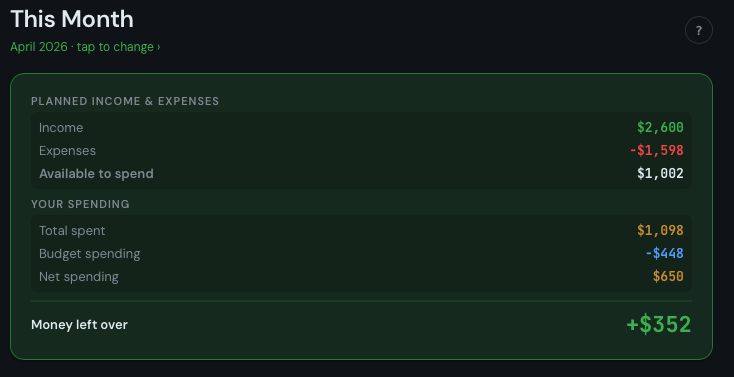
Most budget apps track what you spent. Ridgeline Budget asks you to decide in advance what you're allowed to spend - on needs. Everything else comes from savings you've built up.
Spending decisions get simple: does this come from a budget, yes or no? There's no guilt attached to either answer - it's just accounting.
- Needs are budgeted. Wants draw from envelopes.
- Surplus distributes automatically on month close.
- Deficit pulls from the Expensive Months budget, not willpower.
Works for two people with different styles
One person tracks every cent; the other just wants to know if the month looks okay. Ridgeline Budget was built for exactly this dynamic.
The Dashboard answers the daily question in seconds: a big surplus or deficit number, a fast spending entry form, and your most recent purchases. Enable Simple Mode in Settings so the less technical partner sees only the Dashboard - without the advanced Income, Expenses, and Progress screens.
- Shared workspace means both people see the same numbers.
- Real-time sync across all devices - phone, tablet, desktop.
- Account totals are added up from the entries beneath them, so two people recording at the same moment never overwrite each other.
- Simple Mode hides advanced screens for a cleaner experience.
- Deep enough for a full monthly financial review when you need it.
Total privacy. Nobody reads your data.
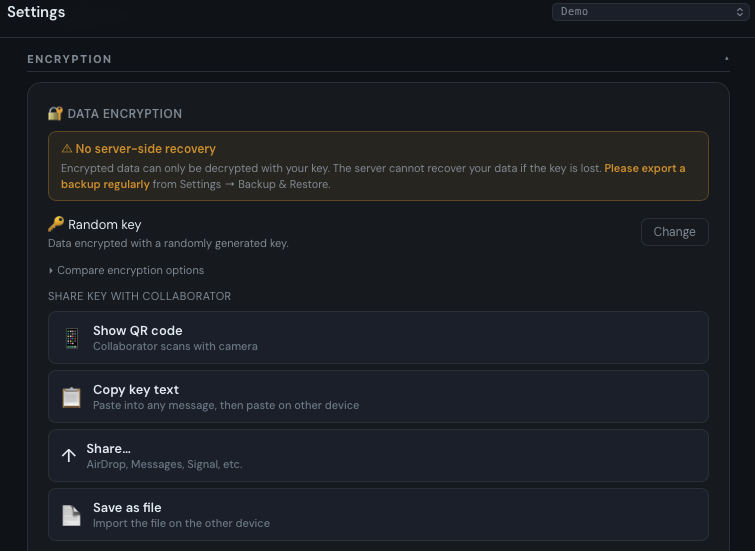
Your financial data is encrypted on your device before it touches the server. The encryption key never leaves your device. Not us, not a hacker, not anyone.
We built this for our own household. We have no interest in your spending patterns, no advertisers to serve, and no data-monetization model.
- AES-256 encryption applied before data is sent.
- Key stored locally - never transmitted.
- No ads. No third-party analytics. No selling your data.
- Export your backup and store it wherever you trust most.
Every expense amortized, automatically
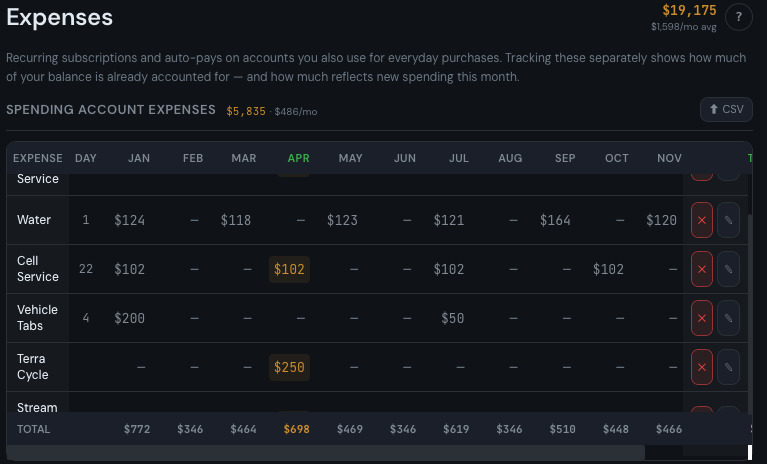
Car tabs once a year. Water bill every other month. Annual gym membership. Ridgeline Budget spreads irregular expenses across the year. Lighter months result in more money flowing to the Expenses Calendar budget. This is created automatically in each workspace. Add a Due Day and those items will show up on the Dashboard with a reminder that it should be charged soon.
Every recurring bill lives in one table - subscriptions, insurance, utilities, loan payments - with each expense entered for exactly the months it applies and other months left empty. Import your whole spreadsheet in seconds.
- Per-month amounts for irregular bills, credits and refunds included.
- CSV import from a downloadable template.
- One Source column decides each bill's treatment: funded from a card you spend on, or left to draft itself automatically.
- Expenses Calendar budget accumulates automatically for the funded ones.
- Record Now button when charges hit your card.
A system that closes the loop
Most budgets track spending. Ridgeline Budget closes the month. When you tap "Finish Month," surplus flows to budgets, history is recorded, and you start the next month with a clean slate.
Priority budgets fill first. Standard budgets share the rest. Budgets set to Skip Auto-Fill let you track reimbursable expenses or custom accounting without affecting the surplus.
- Three budget types: Priority, Standard, and Skip Auto-Fill.
- Configurable split between priority and standard.
- Month close is reversible - undo the last close if needed.
- 6 chart types across up to 5 years of history in Reports.
| Feature | Ridgeline Budget | Most apps |
|---|---|---|
| Needs-first philosophy | ✓ | — |
| Budget envelopes | ✓ | Partial |
| Irregular expenses | ✓ | — |
| Month close | ✓ | — |
| End-to-end encryption | ✓ | Rare |
| Free to start | ✓ | — |
| Multi-device sync | Paid | Often paid |
| No ads | ✓ | Often ads |
Free to start · Optional paid sync
See it for yourself.
Try the full app free on one device. Add sync and collaboration for $3/month or a one-time $35.